Public Safety DFR Integration

FlightHub 2 as the response layer

A customer-facing deck for public safety and emergency response teams, showing how DJI Dock, FlightHub 2, CAD, VMS, PSIM, command center, and evidence workflows fit together.

Dock
UAV
FH2
Response ModeDFR
Trigger SourceCAD
Video PathVMS
DeploymentOn-Prem

Deck Scope

What this DFR integration deck covers

The structure follows the same online deck style as the FlightHub 2 AERONEX training material, with tighter cards, visual panels, and presales-ready integration logic.

Part 01

DFR Response Story

Launch on alert, put eyes on scene, and give command center a faster aerial picture before ground units arrive.

Part 02

FlightHub 2 Workflow

Show the role of FlightHub 2 in receiving triggers, dispatching Dock missions, live streaming, and synchronizing records.

Part 03

CAD / VMS Integration

Explain event trigger, task assignment, video routing, status backflow, and command center display flow.

Part 04

Evidence & Security

Position recording, archive, on-premises deployment, and IT review boundaries without exposing sensitive implementation details.
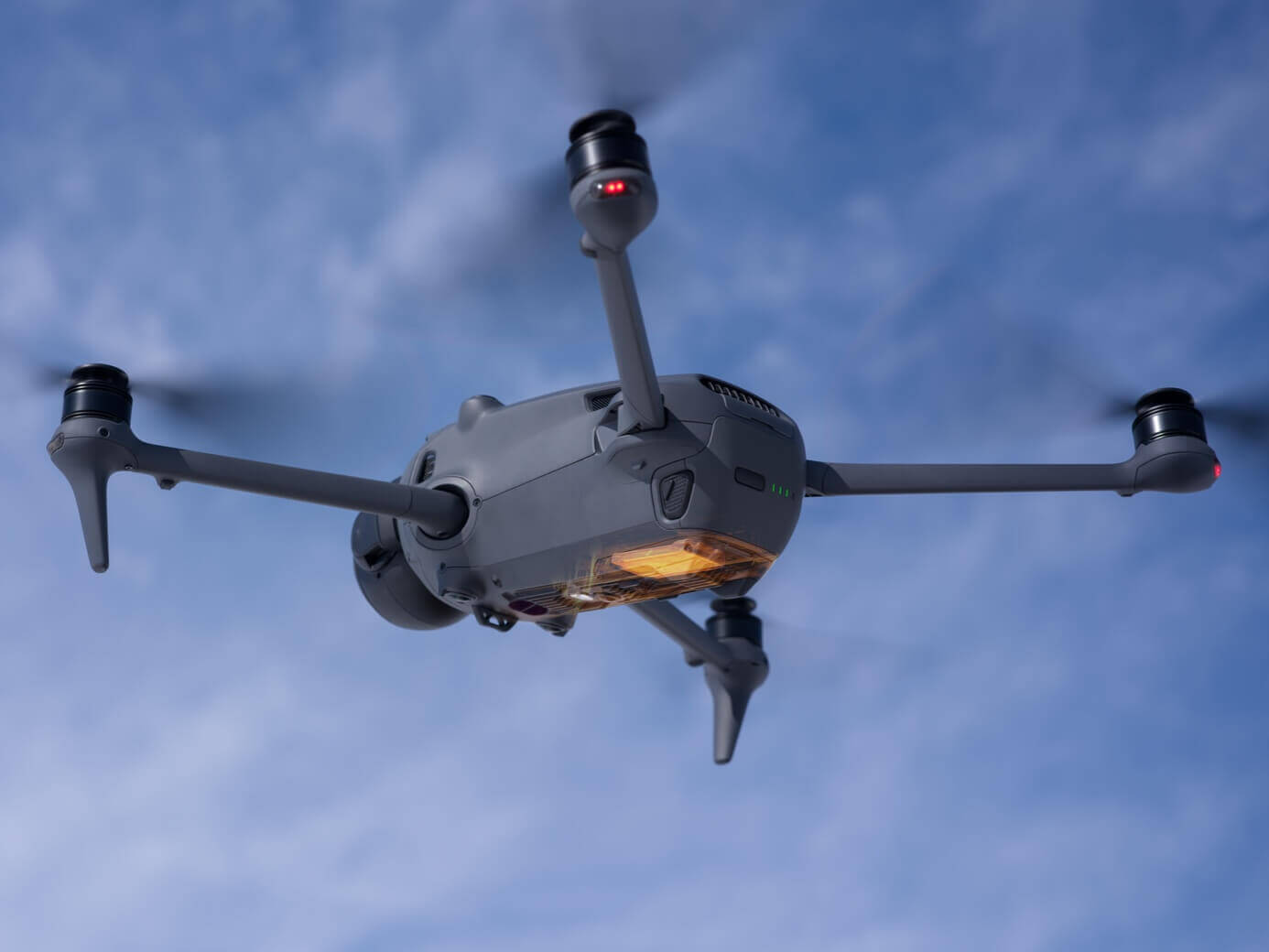
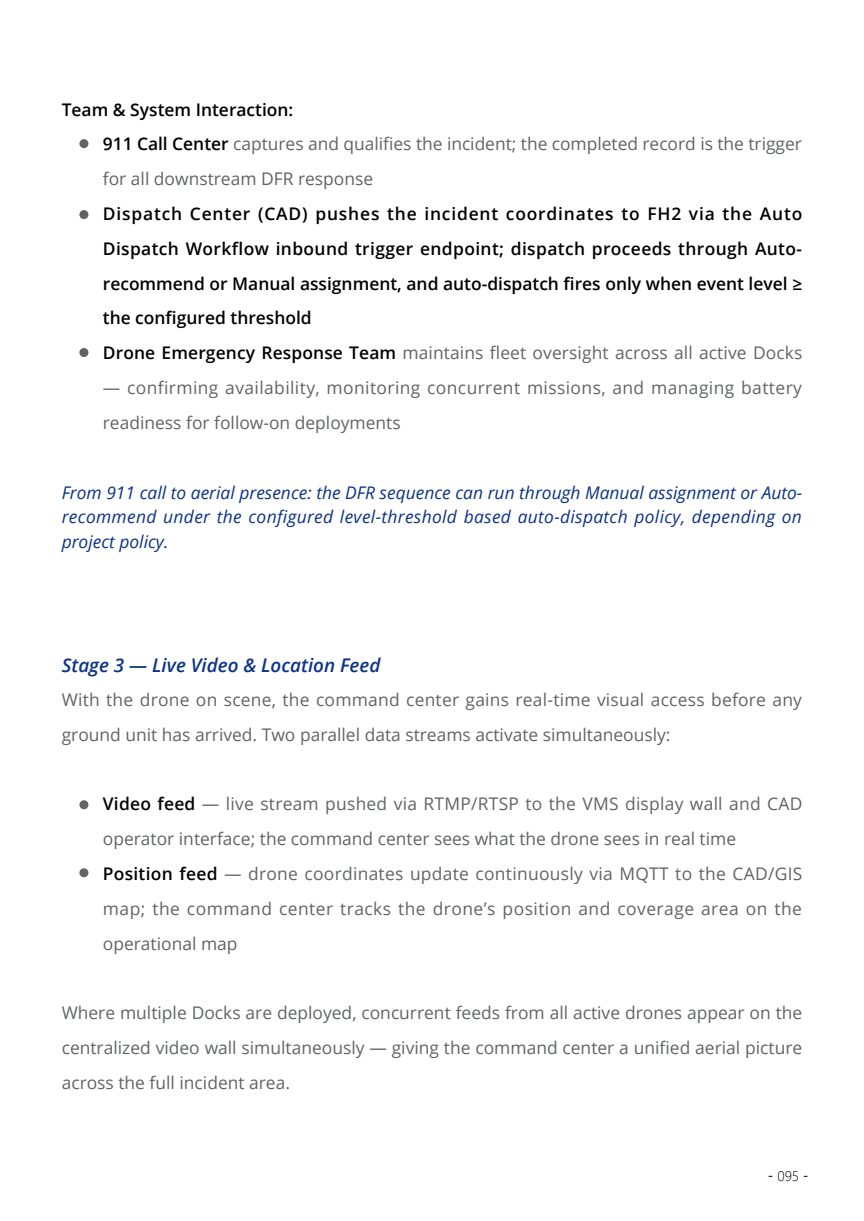
Operational Workflow

From incident trigger to searchable mission record

DFR should be presented as a complete operational workflow. The aircraft launch is only one step; the customer value is the integration chain across dispatch, aerial awareness, video distribution, and evidence review.

Mission timeline and task context Official DJI DFR video fixed locally for stable Cloudflare loading.
1. TriggerCAD, alarm, PSIM, or sensor event sends incident context and location.
2. DispatchFlightHub 2 recommends or prepares the nearest available Dock mission.
3. FlyOperator confirms launch, monitors cockpit, and controls camera or mission path.
4. ShareLive video reaches VMS, PSIM, or command center screens through the selected video path.
5. ArchiveMission record, telemetry, screenshots, clips, and media references support later review.
Alert InIncident coordinates and response priority enter FlightHub 2.
Auto DispatchDock selection, flight preparation, and operator confirmation.
Live OverwatchAerial stream, aircraft location, and task status are shared.
Evidence TrailMedia and events stay connected to the response record.

System Topology

The neutral architecture for customer workshops

Use this topology to explain responsibilities without naming customer systems or exposing implementation details. It is suitable for public safety presales, technical enablement, and system integrator alignment.

Field LayerAutomated launch and aerial data capture.
DJI Dock 3
Drone
Payload Camera
Telemetry
Operation LayerRemote control and response orchestration.
FlightHub 2
Auto Dispatch
Virtual Cockpit
FlightHub Sync
Command LayerThird-party systems consume trigger, video, status, and records.
CAD System
VMS Platform
PSIM
Evidence Archive

Alert In

External incident context becomes a FlightHub 2 response task

CAD, alarm, PSIM, or sensor events provide the incident location and context. FlightHub 2 translates that trigger into a mission workflow that can be reviewed and dispatched by the operator.

Presales message

Explain the flow as event trigger, coordinate handoff, Dock recommendation, and operator confirmation.

Public boundary

Show protocols and architecture only; keep implementation credentials and customer routing details private.

Incident context on map Coordinate-driven response is the starting point of DFR integration.
Dock readiness 24/7 standby infrastructure turns alerts into an aerial response workflow.

Dispatch

FlightHub 2 keeps the human decision point visible

For customer-facing discussion, emphasize that automated response can still include a clear operator role: validate the incident, confirm launch, monitor the flight, and take over when required by SOP.

Nearest Dock logic

Availability, distance, device state, and configured task rules support the recommendation.

Virtual Cockpit

Remote pilots keep aircraft state, camera view, map context, and task progress in one operating layer.

Response traceability

Dispatch and flight actions remain connected to the incident and post-event review path.

VMS Integration

Live aerial video enters the existing command center view

The VMS story is simple: FlightHub 2 does not replace the command center platform. It contributes a live aerial feed that can be displayed beside fixed cameras, incident maps, and operator dashboards.

Command center operator interface for remote drone response
Command center consumptionDrone video becomes another operational view for incident coordination.
Video PathBest FitPresales Note
RTSPVMS, IP-camera workflows, local command room display.Use when drone video should behave like an existing camera feed.
RTMPEvent-driven publishing and broader stream distribution.Use when dispatch-linked live sharing is required.
RelayMultiple consumers, protocol conversion, NAT or firewall constraints.Use when more than one system needs the same live stream.
Technical reference: DFR whitepaper live video integration section

CAD Backflow

The command system receives status, not only video

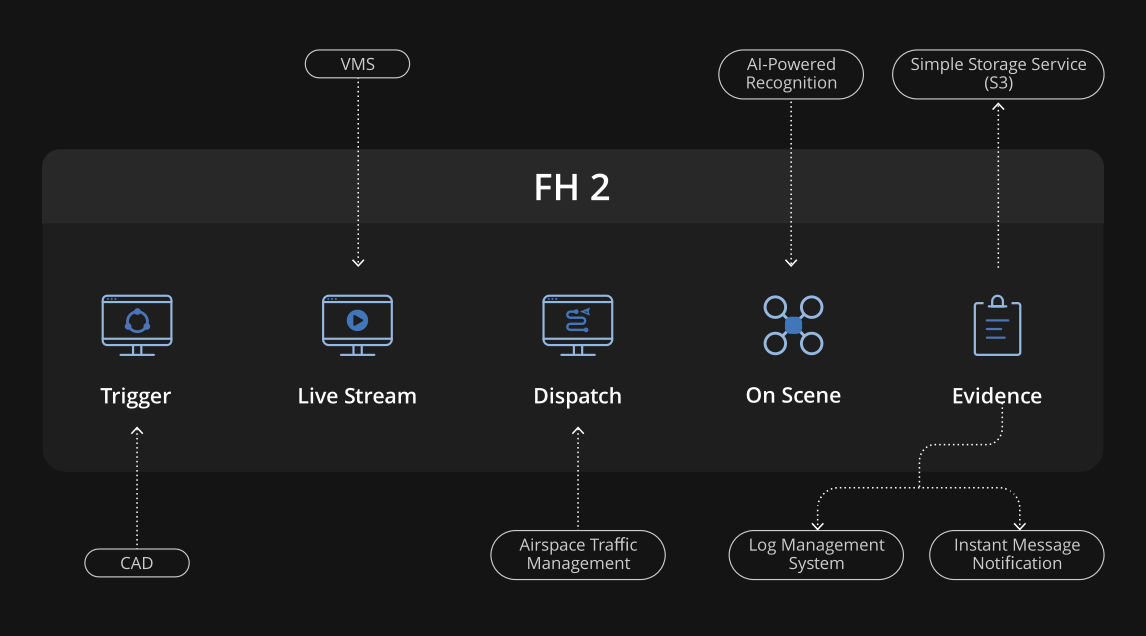
CAD integration closes the loop. The incident starts the aerial response, then FlightHub 2 mission state, aircraft location, and media references can support dispatch users and incident records.

DFR whitepaper CAD workflow diagram
CAD workflow referenceTrigger, task creation, live status, and record linkage.

Event Trigger

Incident information enters FlightHub 2 from CAD, alarm, PSIM, or sensor source.

Mission Status

Aircraft state, task phase, and response progress can be reflected back into the command workflow.

Record Linkage

Media, clips, snapshots, and task records can remain connected to the original incident.

Evidence & Recording Extension

Recording supports DFR without turning this into an NVR deck

Keep evidence as an extension: enough to show playback, retention, and investigation value, but not so much that it distracts from the FlightHub 2 integration workflow.

Live Stream

Operational View

Command users watch the aerial picture during the response; the stream can also be recorded by the approved video platform.

Mission Media

Post-Event Review

Photos, clips, screenshots, and mission output can support investigation and after-action review.

Event Trail

Traceability

Dispatch, launch, flight status, operator activity, and evidence references stay tied to the mission record.

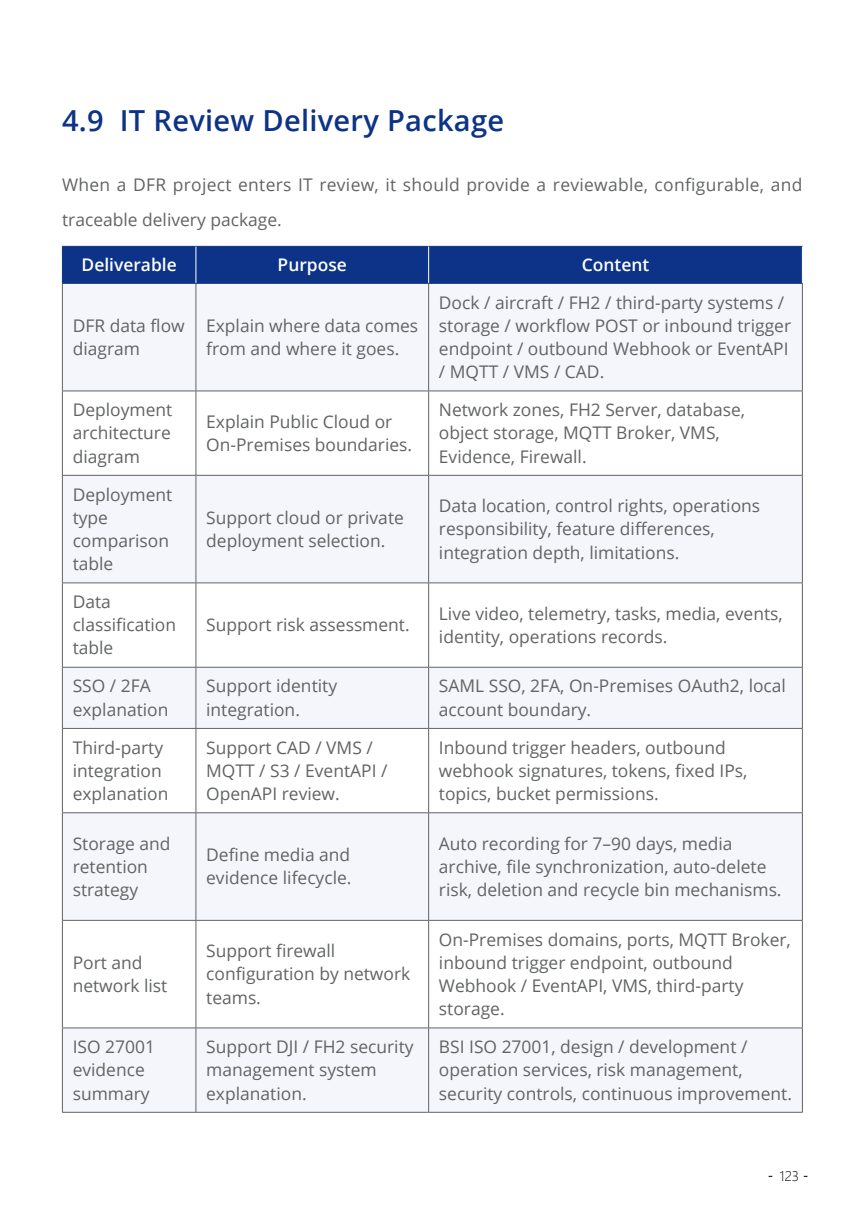
DFR whitepaper IT review preparation table
IT review packArchitecture, data flow, retention plan, ports, and security summary.

Deployment Boundary

Position On-Premises and AIO as controlled integration paths

Public safety customers usually care about data control, network boundaries, and operational governance. The deck should show the deployment model and review checklist, not private implementation details.

AreaShow in DeckKeep Private
CAD / PSIMIncident trigger, coordinate handoff, response confirmation.Authentication material and customer-specific routing.
VMSRTSP / RTMP / relay decision and command display flow.Internal addresses, credentials, firewall rules.
ArchiveMedia sync, retention concept, case linkage.Storage identifiers and access keys.

Presales Workshop

A simple agenda for customer and integrator alignment

Use this sequence after the deck presentation to move from interest to solution design. It keeps the discussion practical and avoids jumping too early into low-level API implementation.

Define IncidentSelect one DFR scenario and one dispatch source.
Map ControlConfirm operator role, Dock selection, launch policy, and SOP.
Route VideoChoose RTSP, RTMP, direct stream, or relay based on VMS design.
Close RecordLink event, video, mission status, and evidence archive.
Aircraft responseFast aerial awareness for public safety teams.
Operator reviewing DFR command information
Operator workflowHuman confirmation and remote oversight remain clear.
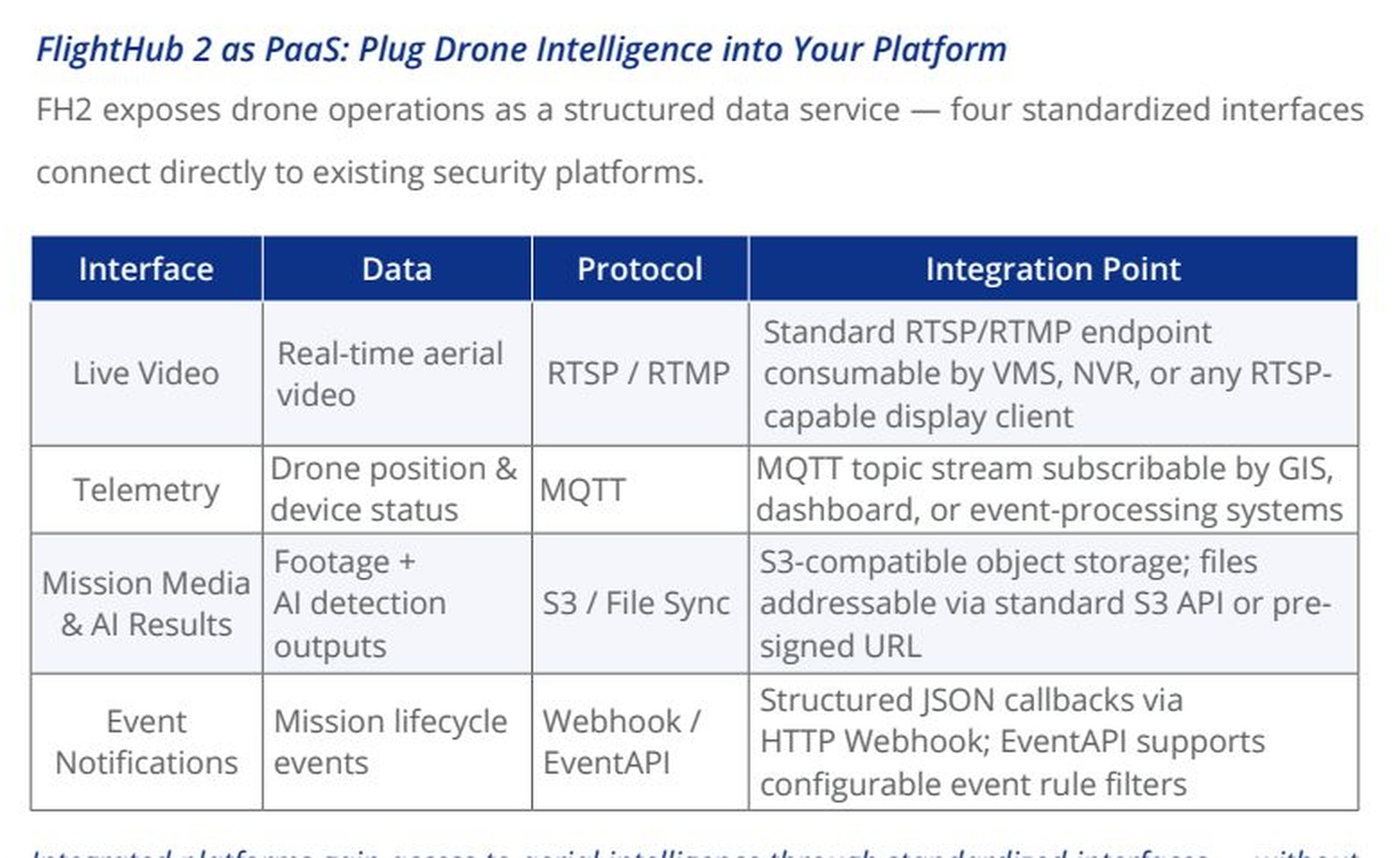
Zoomed DFR whitepaper interface map for live video telemetry media and event notification
Interface mapLive video, telemetry, media, and event notification.

Reference Material

Continue with the DJI DFR whitepaper

This deck is intentionally customer-facing. For deeper details, use the whitepaper as the technical reference and keep sensitive implementation information inside controlled project documentation.

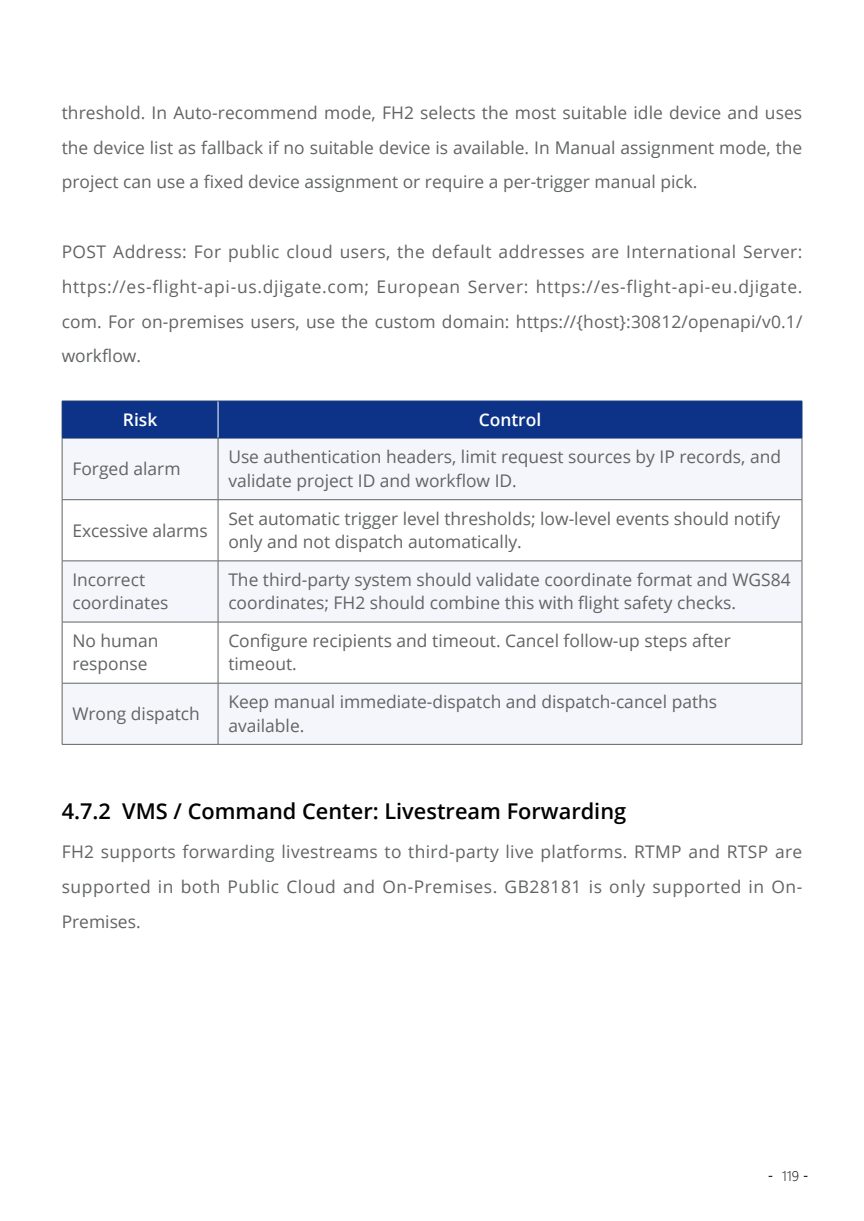
DFR whitepaper section 4.7 integration reference
Whitepaper 4.7CAD, VMS, telemetry, GIS, PSIM, archive, Event API, and OpenAPI integration scope.